Page 2 of 9
Posted: 22 Dec 2006, 22:27
by tom2681
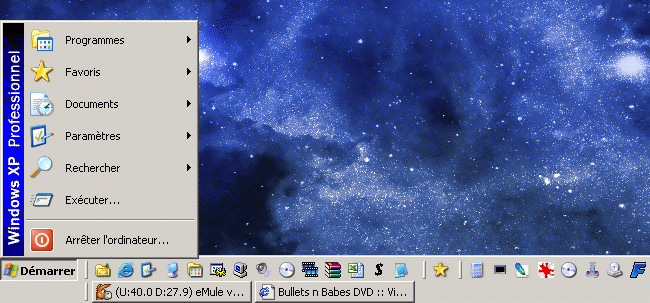
Brad wrote:Tom you said the same about the XP Start Menu. Aren't you still using the 95 one?
Of course.

I just don't understand why we'd need so many buttons.
Posted: 22 Dec 2006, 22:31
by bradavon
LOL that's funny you say that but at the same time have more buttons in your Quick Launch than programs I have installed. To the point you have less screen space.
It's no different, except the XP way is better

. Like Is said to me it looks odd to put XP on and then go back 12 years.
Posted: 22 Dec 2006, 22:34
by Lourdes
bradavon wrote:Nothing except they're outdated (the XP one you can access Quick Programs and My Computer instanly). What's wrong with Windows 2000? Nothing but XP is better.
The XP Start Menu not to be confused with the XP Theme (which is just green and blue instead of grey anyway) is more concerned with usability and much easier to navigate.
There's nothing on the new one that you can't easily add to the old. All the new one does is take up more room.
The default XP theme is more than just the ugly colours...
Posted: 22 Dec 2006, 22:40
by Lourdes
My quick launch bar takes up a whole fifth of my screen width, how awful!
https://www.bulletsnbabesdvd.com/forums/ ... tled-1.jpg
Posted: 22 Dec 2006, 22:43
by tom2681
@Lourdes:
Maybe you should try my method.
As seen above, on my PC the taskbar is twice as tall as yours. All icons are at the top, all windows are at the bottom.
It doesn't take up any room because I use the taskbar's auto-hide feature.
That's how it looks:
https://www.bulletsnbabesdvd.com/forums/ ... barnew.gif
Posted: 22 Dec 2006, 22:50
by bradavon
I can't stand Auto-Hide
, oh and both task bars look a cluttered mess
. I have 6 icons in my Quick Launch, anymore it gets messy (lots of silly tiny icons).
I'll shut up.
Posted: 22 Dec 2006, 23:08
by Shen
i still use the win95 lay out too, much tidier, dont see the need for all the images and buttons. plus my quicklaunch bar is neat too

only 3 icons the rest are hidden in a little menu...
https://www.bulletsnbabesdvd.com/forums/ ... screen.JPG
i like my desktop to be tidy. cant stand uncessary buttons.
Posted: 22 Dec 2006, 23:17
by bradavon
You mean task bar or start menu

. Don't you run Messenger at start up? Is that Media Center I see???
Your desktop has shortcuts all over it. I remember seeing Eva's a while back (I think it was Eva's) and the whole screen was covered in crap
I've only got My Computer and Recycle Bin on my desktop. I don't like it using it too, too much clutter hides the pictures. I access the lot through the Start Menu.
Posted: 22 Dec 2006, 23:26
by Shen
yeah but im too lazy to run programs through the start bar

actually never used the shortcuts on my desktop except for my computer and recycle bin, and the shortcut to my external hard drive, gotta have quick access to music and such
everything else such as BSPlayer, mozilla, etc is accessed through quick launch. could probably delete those shortcuts..hmm
and yes its media center, came with pc. never used it lol.
no i dont run messengers on start up, it annoys me too much to wait for them to load up, plus its just as easy to load up when i want to use them.
as for them taking up the picture...thats why i like the image i have up, i can have some icons and still have an uncluttered picture
of course you should see the desktop when i've been too lazy to save files to their correct folders...i've had that take up the whole screen too. lol
Posted: 23 Dec 2006, 00:11
by Lourdes
tom2681 wrote:@Lourdes:
Maybe you should try my method.
As seen above, on my PC the taskbar is twice as tall as yours. All icons are at the top, all windows are at the bottom.
It doesn't take up any room because I use the taskbar's auto-hide feature.
That's how it looks:
https://www.bulletsnbabesdvd.com/forums/ ... barnew.gif
I was being sarcastic. I have plenty of room as is.
Posted: 23 Dec 2006, 14:58
by bradavon
Shen wrote:and yes its media center, came with pc. never used it lol.
What's it like? I knew it was just a front end but never realised it was just literally another program.
Shen wrote:no i dont run messengers on start up, it annoys me too much to wait for them to load up, plus its just as easy to load up when i want to use them.
Fair enough but people can't contact you that way. It reminds me of my Dad who only turns his mobile on when HE wants to make a phone call.
It's most annoying.
Posted: 23 Dec 2006, 15:27
by Shen
anyone importan knows my phone number anyway and thats always on
i mean i usually have messengers on most of the time, but other times if im busy then i need to avoid distractions, if someone messages me then my work goe sout of the window
as for media center i honestly dont know, i have loaded it up at all yet. but i'll check it out later and tell you.
Posted: 23 Dec 2006, 16:59
by bradavon
So "Appear Offline"
I'm surprised you've not loaded it even once.
Posted: 23 Dec 2006, 17:32
by Shen
yeah but theres still the temptation to message a friend online then bang goes my idea about getting my work done
been too buys to realy mess around with the pc too much. i will eventually load it. but i havent needed it yet.
Posted: 23 Dec 2006, 18:12
by bradavon
So have it running but logout
, okay I'll stop
Posted: 03 Jan 2007, 16:12
by Kurgan
I've played about with Vista for a while now (I've had access to a perfectly legitimate Evaluation copy) and whilst it all seems fine and dandy, there just seems to be a vague level of familiarity to it all...
I'll let this guy tell it slightly better than I can. He seems to be a bit of a dick, but you can't deny the facts
New York Times bloke
Posted: 03 Jan 2007, 17:34
by EvaUnit02
*Samples video*
HAHAHA, what a fucking queer that guy is. He would feel more at home writing for a San Francisco paper.
BTW we already knew that Vista is rip off of OSX. Hell, IE7 is a poor rip off of Firefox.
Posted: 03 Jan 2007, 19:06
by slasher13
EvaUnit02 wrote:*Samples video*
HAHAHA, what a fucking queer that guy is. He would feel more at home writing for a San Francisco paper.
BTW we already knew that Vista is rip off of OSX. Hell, IE7 is a poor rip off of Firefox.
Def Micro$oft is simply playing catch up at the moment, I don't think they will ever go beyond. But saying that, other developments of their are very very good...
Posted: 03 Jan 2007, 19:11
by bradavon
Firstly how many ways can you design a calender and thumbnail tool? They're bound to look similar.
Other than that it's common knowledge Microsoft are at their best when they're copying ideas or buying companies out, it's not exactly news.
I bet Apple has copied MS over the years too but of course no one bothers to mention that. Didn't Apple ShowTime come out after Windows Media Center?
I don't give a hoot if MS copy from others, all it means is Windows gets better.
That video is quality though
. Not that I give a monkeys I'm still not moving to Apple
p.s - Then again as Slasher says MS have PLENTY of ideas of their own. It's not like all they do is copy or buy out. I bet Vista has things MacOS can't do.
Posted: 11 Jan 2007, 19:40
by romerojpg
Well from what I have seen Vista sucks for many things.
Games for instance seem to really need some serious patching and new stuff as a lot of them run like shit.
Doom 3 for instance in a test I saw runs at a nice speed of 80 frames per second on XP, which is wonderfully fluid, on Vista it runs at 28 frames! now that sucks bad! it seems to be the same for many games, and video re-encoding, they better sort that shit out as no way I want that kind of problem when I get my new PC in a while.
I want Vista running faster than XP for games or I keep XP.
Posted: 11 Jan 2007, 19:51
by bradavon
romerojpg wrote:Games for instance seem to really need some serious patching and new stuff as a lot of them run like shit.
It's only been out 2 minutes what do you expect?
People expecting the same level of efficiency from a product which is only a month old against a product which has been bedded in for 5 years are living in cloud cuckoo land.
Besides if so it's not Vista but clearly the games manufacturers who need to release patches, which they will. Windows 95 right through to XP had exactly the same issues on release. People seem to forget this.
romerojpg wrote:Doom 3 for instance in a test I saw runs at a nice speed of 80 frames per second on XP, which is wonderfully fluid, on Vista it runs at 28 frames! now that sucks bad!
I presume it was the same PC and the PC was properly capable of running Vista? If not it's not a fair test in the slightest.
romerojpg wrote:it seems to be the same for many games, and video re-encoding, they better sort that shit out as no way I want that kind of problem when I get my new PC in a while.
Like I said you'll find it's not MS but the software makers that need to release patches to make their software Vista compatible.
This is how it's been since time began
romerojpg wrote:I want Vista running faster than XP for games or I keep XP.
Obviously that's possible provided you upgrade your hardware too.
Posted: 11 Jan 2007, 19:51
by bradavon
Can MS AntiSpyware (Defender) be uninstalled or is it one of those annoying apps which you have to have installed?
I used Beta 1 and while it looked nice didn't find it very secure. I'll be using something else.
Posted: 11 Jan 2007, 19:56
by romerojpg
Yup all the tests I saw were on the same machines.
Yes I want Vista, but not until all the games I want to play are running faster than on XP, that could be a while away. I am not going Vista and a new PC until some of this craps all done and dusted.
I expect all new games to run like the bomb on Vista, but I still dont imagine even they will.
Posted: 11 Jan 2007, 20:03
by bradavon
It won't take long for the main drivers/software/games to all be Vista happy.
Things will really take off come the 30th of January when Vista is released to the world.
Posted: 11 Jan 2007, 20:09
by romerojpg
and the pirates rake in the cash from pirate Vista


