Page 1 of 1
Fist of Fury: Fox vs HKL (PE)
Posted: 02 Oct 2006, 16:19
by Markgway
Fox (00:01:18)
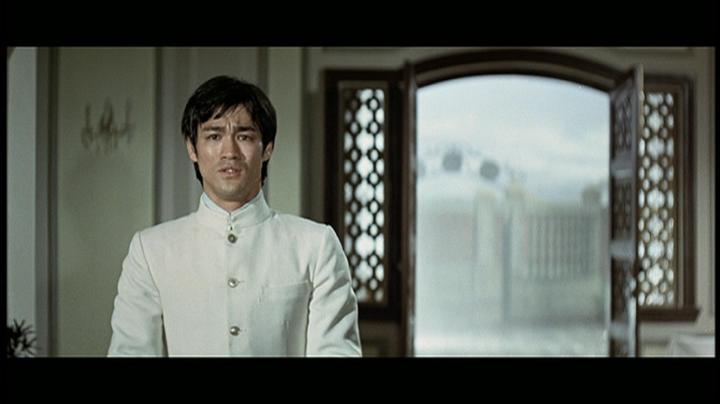
HKL PE

HKL CE

Fox (00:05:41)

HKL PE

HKL CE

Fox (00:20:50)

HKL PE

HKL CE

Fox (00:43:02)

HKL PE

HKL CE

Fox (01:32:36)

HKL PE

HKL CE

Fox (Example of Ghosting)

HKL PE

HKL CE

Posted: 02 Oct 2006, 19:20
by bradavon
Cheers Mark. I'll try and add the HKL PE soon, unless anyone else wants to? A comparison with the original HKL and IVL would be decent too.
What time frame is that last shot?
Posted: 02 Oct 2006, 20:06
by grim_tales
Colours look very natural on the Fox but also muted, I guess thats how it is supposed to look 8) Excellent transfer.
Posted: 02 Oct 2006, 20:14
by Keung
Just uploading PE's shot's now.

Posted: 02 Oct 2006, 20:22
by Keung
Posted: 02 Oct 2006, 20:39
by bradavon
Too slow
. It does prove the Image software has an affect as your captures are slightly pinker than mine, darker too.
Mine added using MPC with "Null (Uncompressed" selected and then resized using Corel Photo-Paint 12 with 15% compression. Bear in mind Mark used PowerDVD so don't take the difference as gospel but it will give you a good idea.
Posted: 02 Oct 2006, 20:42
by bradavon
Hard one this: Yes agreed overall the Fox wins but the Interlaced issue is well an issue. Check out the last shot!
The pink isn't nice but then the Fox is too dark. It's clear both come from the same Master and of course both have decent removable subs (I presume?) and Mandarin Mono.
I'd say overall as a package the HKL wins but PQ goes to Fox.
EDIT: The Fox looks to be cropped ever, ever so slightly. No where near enough for me to care but it's there (if you look hard).
Posted: 02 Oct 2006, 20:46
by bradavon
Mark why did you trade WOTD Fox? It's clearly the best transfer by quite some way. The HKL stinks.
I wish they'd re-release this one! The same but use the FS print; I'd be well chuffed with that.
Posted: 03 Oct 2006, 00:54
by Markgway
I only wanted the first two films. Not a big fan of WAY apart from the fight scenes.
I used Power Cinema not Power DVD.
I didn't include a time for the last cap as it was only intended to show Fox's ghosting (I knew the HKL wouldn't have that effect).
Interlacing aside -- the Fox image is clearly better. HKL have pinkified their image as can be seen on every cap. Look at cap 4: is Bruce wearing lipstick?
For shame. As I otherwise would have recommended the progressive HKL.
I wonder if Joy Sales will ever re-issue improved versions in HK?
Posted: 03 Oct 2006, 08:45
by grim_tales
The cap with Bruce and Bob Baker definitely looks pinker than I remember it.
Posted: 03 Oct 2006, 19:57
by bradavon
[quote="Markgway"I used Power Cinema not Power DVD.[/quote]
It's not important. You didn't use MPC so they're not going to look the same.
You have all the effects settings turned off right?
Markgway wrote:Interlacing aside -- the Fox image is clearly better. HKL have pinkified their image as can be seen on every cap. Look at cap 4: is Bruce wearing lipstick?
It's a pretty big one IMO. I'd read many a time people moaning because a HK DVD is interlaced, this is no different.
Agreed though it's better but then I don't moan about interlacing. I still say overall the HKL wins but that's just me.
Markgway wrote:I wonder if Joy Sales will ever re-issue improved versions in HK?
Personally I don't think until the HD version now.
Posted: 07 Oct 2006, 16:12
by chenlung
The pink isn't nice
Finally

!
Hahaha!
Posted: 10 Oct 2006, 15:10
by tom2681
Erm... There's a problem with the FOX caps.

Interlacing should be seen as "combing", not "ghosting".
If there's ghosting, it means that deinterlacing is activated.
If deinterlacing is activated, it means that the FOX is much sharper in reality than what we're seeing here.
Posted: 10 Oct 2006, 18:59
by bradavon
Any chance of a cap showing combing please? How does deinterlacing differ from progressive?
Posted: 10 Oct 2006, 19:21
by tom2681
https://www.bulletsnbabesdvd.com/forums/ ... php?t=2428
This thread will soon answer all your questions.
(I'm working on it)
Posted: 10 Oct 2006, 20:12
by bradavon
Nice one cheers, good idea.
This sort of comparison is quite unfair, since these lines won't appear at all on a normal TV.
An LCD TV you would or is that example of an inaccuracy?
Posted: 10 Oct 2006, 21:14
by tom2681
Actually you should never be able to see those lines.
Not on a TV, not on an LCD monitor, not even on a projector.
Deinterlacing always "blends" the lines.
AFAIK: there are two ways of displaying combing:
1. By deactivating deinterlacing in your software player.
2. By forcing progressive mode on your standalone player.
When you're watching the movie, you won't be seeing combing. You will only see ghosting.
Posted: 10 Oct 2006, 21:29
by bradavon
Thanks
Posted: 11 Oct 2006, 00:15
by Markgway
Sorry guys,
I thought ghosting was caused by interlacing...
My tech knowledge isn't the best...
Maybe Tom can sort this all out.
Posted: 30 Oct 2006, 02:16
by chenlung
Posted: 30 Oct 2006, 04:48
by Markgway
Updated.
HKL CE is the worst of the three.
Posted: 30 Oct 2006, 09:17
by grim_tales
HKL CE looks "stretched"
Posted: 30 Oct 2006, 09:51
by chenlung
Yeah it is in certain scenes and the colour correction went haywire.
 .
.


