Page 1 of 1
What program do you use to display your images?
Posted: 08 Dec 2006, 17:53
by tom2681
I'm looking for a program that's fairly light and can be launched in a couple of seconds (so: no Photoshop or Paint Shop Pro).
It also has to be compatible with most formats (PNG, JPG, BMP, TIFF, GIF, etc...).
Right now I'm using Micro$oft Photo Editor and that's fine, but it doesn't like high-resolution pictures.
What are you guys using?
Posted: 08 Dec 2006, 18:12
by romerojpg
irfanview is one of the best on the market, once your settings have been set to what you like its the best you can get I say. I edit images in Photoshop and view them on this and it does plenbty of things as well as letting you view most video formats too

Get it here for free
http://www.irfanview.com/
Posted: 08 Dec 2006, 19:10
by tom2681
Thanks.
I've never tried that one.
Posted: 08 Dec 2006, 19:42
by IronMonkey
What's wrong with the Windows XP built-in Picture & Fax Viewer? That does the job.
Posted: 08 Dec 2006, 20:07
by tom2681
You can't customize it.

Irfanview looks good so far.
Posted: 08 Dec 2006, 20:41
by romerojpg
Once you mess about with Irfanview for a while and get it running your way its great and you can get loads of add ons etc..
Picture & Fax Viewer for me is not the best available to people, its just abit dodgy to me and I could never go back to that ever again after trying better products
I hate the way it displays pics, its clunky (techincal term that). I edit photos a lot and store them in their thousands and looking thu them need to be quick and easy, Irfanview just seems the best I have tried. Give it a quick go you may like it

Posted: 08 Dec 2006, 21:41
by IronMonkey
I tried it out on my test PC once but I didn't like it. I don't really have much use for it anyway to be honest. I use Paint Shop Pro for my editing needs & Picture & Fax Viewer for viewing files.
I don't see the point of adding another program to Windows when the built in one does a perfectly good job for me...
Posted: 08 Dec 2006, 22:15
by bradavon
To View photos I use the built in Picture and Fax viewer, it does the job. To edit Corel-Photo Paint. I used to use Adobe Photoshop but prefer Corel Photo-Paint. Paint Shop Pro is okay but basic.
If I want to view a thumbnail selection I use Microsoft Digital Image Suite but in reality I rarely use it. Explorer and Picture and Fax viewer do the job.
IronMonkey wrote:I don't see the point of adding another program to Windows when the built in one does a perfectly good job for me...
Agreed. All it has to do is open a jpeg.
I hate the way it displays pics
What that it loads them? Sure it has no thumbnail view but then you can do that in Explorer anyway.
tom2681 wrote:You can't customize it.
What do you want to customise? It opens them doesn't it.
Irfanview reminds me of Microsoft Imaging which came free with Windows 2000 and is basic as hell (I don't know if Irfanview is).
Posted: 08 Dec 2006, 23:49
by tom2681
Brad wrote:What do you want to customise? It opens them doesn't it.
White background. That bothers me.
I'd rather have it black (like in Irfanview) or grey (like in Photo Editor).
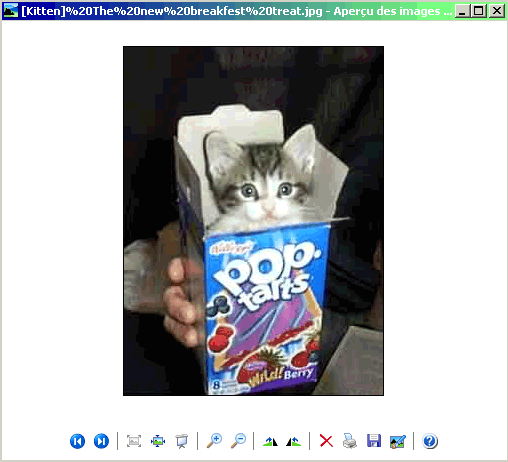
That white background is just

Posted: 08 Dec 2006, 23:56
by bradavon
I've said it before and I'll say it again Tom you have weird tastes
(you want to customise the background, talk about petty
).
Is that MS Photo Editor? The incredibly basic photo program, only made to look good next to MS Imaging and only appearing the once in Office 2000. You'd prefer to use that over Picture and Fax viewer?
MS do love creating new photo programs for every version of Windows and Office. At least they've finally stuck to the same photo program for their "proper" photo suite. It was called Picture-IT but is now called Digital Image Suite, it's pretty good actually. As for the free offering with basic functionality well they've not decided on one of those yet.
It's different again in Office 2003 (Photo Manager I think).
Posted: 08 Dec 2006, 23:59
by tom2681
Is that MS Photo Editor? ... You'd prefer to use that over Picture and Fax viewer?
Well yeah, since Picture and Fax viewer hurts my eyes.

It is basic, but it's also pretty much all I'm looking for anyway.
Posted: 09 Dec 2006, 01:22
by romerojpg
Irfanview is a lot more advanced than you think then Bradavon, by a mile. I am sure I dont just look at an image, I zoom in, scan, rotate etc.. maybe I am a freak then, but I like to do more than just look at an image with a hideous engine and silly boxes around my pics
Picture and Fax viewer does the job obviously and most people wouldnt do anything else as they dont even know you can do anything else, but I have tried many and Picture and Fax viewer is so basic its hideous
The best thing about it mind you if for viewing Gifs, I like the interface on Picture and Fax viewer for them and used to have it set for all my gifs, so it has its uses that for sure.
Think of it like the difference between Photoshop compared to pretty much all other art/edit programmes, they may do pretty similar things, but Photoshop is by far the leader when you get to use it regulary and learn to use it all (which takes years sadly).
Still its what you get used to on the whole I find, some people will never change once they have used something for a while. I try new things all the time for a while, if its crap it goes
I used to use Firegraphic for viewing images, it was superb! then they upgraded it and ruined it

and now they charge for it too, so they made it poorer and make you pay, muppets.
Posted: 09 Dec 2006, 01:27
by romerojpg
Ohh yea forgot to say
Picasa is worth a try, its georgous to look at and makes images come to life, but its a little slow for viewing for me, but boy its bloody clever and the look and interface is amazing for viewing slideshows etc.. one of the best and free! I rarley use it just becuase its a little too much at times, a bit overwhelming, but good for impressing people I guess
Posted: 09 Dec 2006, 01:28
by tom2681
Yeah I've tried Picasa.
A bit too heavy for me too.
Posted: 09 Dec 2006, 01:44
by romerojpg
Yup it is Heavy
still it has so many features and does so much its fun, if a little over the top and it probibly eats your Ram and processor with them fancy features.
Great for slideshow presentations and stuff. Good for just finding images on your PC, took me about 3 hours to find all images on my PC last time and it got near the end and the PC crashed as it overheated
so it lost them all again, bugger.
Posted: 09 Dec 2006, 11:17
by grim_tales
tom2681 wrote:Brad wrote:What do you want to customise? It opens them doesn't it.
White background. That bothers me.
I'd rather have it black (like in Irfanview) or grey (like in Photo Editor).
That white background is just
LOL Tom, cute
What's your cat doing in a pop tarts box?
Posted: 09 Dec 2006, 13:59
by bradavon
Forget that what is Tom doing buying pop tarts? Yuck.
romerojpg wrote:Irfanview is a lot more advanced than you think then Bradavon, by a mile.
Seeing as I've not downloaded it I would be a bit silly if I thought otherwise.
romerojpg wrote:Picture and Fax viewer does the job obviously and most people wouldnt do anything else as they dont even know you can do anything else
The name says it all, it's not supposed to do anything else. If want more I fire up Corel Photo-Paint.
, but I have tried many and Picture and Fax viewer is so basic its hideous
The best thing about it mind you if for viewing Gifs, I like the interface on Picture and Fax viewer for them and used to have it set for all my gifs, so it has its uses that for sure.
romerojpg wrote:Think of it like the difference between Photoshop compared to pretty much all other art/edit programmes, they may do pretty similar things, but Photoshop is by far the leader when you get to use it regulary and learn to use it all (which takes years sadly).
It's all artistry snobbery. Corel Photo-Paint, Adobe Photoshop and Corel Paint Shop Pro Photo are all as good as each other. I prefer the interface on Corel Photo-Paint to Adobe Photoshop. I've been told Paint Shop is lesser to these two but don't know if that's true. I do know there is nothing between Photo-Paint and Photoshop though. It's the Ipod of photo programs.
I've not used Adobe PS since v6.0 but the lack of toolbars and lots of endless menus got on my nerves.
I have been thinking about giving Corel Paint Shop Pro Photo 10 and Photoshop CS2 a go though, as it's been a while since I used both.
Microsoft Digital Image Suite 2006 (I think 2007 is out now) is actually very good too. It's not as powerful as Corel Photo-Paint 12 (13 is out, called X3) but has some neat functions made easier than Corel's approach, plus it's Image Library doesn't exist in Photo-Paint.
From what I can gather Paint Shop Pro Photo has been redesign for amatater photographers in mind whereas Corel Photo-Paint is still there for Professionals, and as always go head to head against Adobe Photoshop.
The funny thing is before Corel bought Jasc Paint Shop Pro was also a competitor to Adobe Photoshop and Corel Photo-Paint so is more powerful than you'd expect. Comparing Paint Shop Pro to Adobe Photoshop Elements it's miles ahead, Photoshop Elements really is basic.
All these similar names though really gets on my nerves :shock: .
romerojpg wrote:Still its what you get used to on the whole I find, some people will never change once they have used something for a while. I try new things all the time for a while, if its crap it goes
I tried 12 different DVD Writing packages when I got my DVD Writer, most were rubbish but 2 were decent (the best is easily DVD Shrink, which is even free).
tom2681 wrote:Well yeah, since Picture and Fax viewer hurts my eyes.
It is basic, but it's also pretty much all I'm looking for anyway.
My god that is basic. You can't even scroll back and forward with Photo Editor.
Posted: 09 Dec 2006, 14:11
by romerojpg
"It's all artistry snobbery" if you think that then it shows you that you really dont know about these things
The experts on these subjects (not me to be honest I find them very complex at times) know their shit.
Posted: 09 Dec 2006, 14:31
by tom2681
Grrr... I should have known.
Irfanview can't open files with chinese characters in the filename (just like Photo Editor). It just says "file not found".
I wonder if there's a plug-in that can make it support unicode...
Posted: 09 Dec 2006, 15:10
by bradavon
Why do you want Chinese filenames? Just rename them in Explorer, they're just filenames.
Fair enough Romero. I still say it's artistic snobbery and the Ipod for Graphics. Oh and it's the standard so you'd be dumb to learn anything else (like MS Office), which turns full circle in no one trying anything else.
